

Knowledge Base Tools (Documentation & Understanding)
A knowledge base tool is designed to store, organize, and share information.
Core purpose:
Capture knowledge so people can learn, reference, and reuse it
Typical use cases:
Documentation (how things work)
Wikis (team/company knowledge)
Guides, specs, FAQs
Key characteristics:
Structured content (pages, links, hierarchies)
Searchable and persistent
Focus on clarity and understanding
Changes slowly over time (more stable)
Examples:
Notion
Confluence
Obsidian
👉 Think: “What do we know?”
Project Management Tools (Execution & Coordination)
A project management tool is built to plan, track, and execute work.
Core purpose:
Help teams get things done on time
Typical use cases:
Task tracking
Assigning responsibilities
Deadlines, milestones
Sprint planning
Key characteristics:
Tasks, tickets, checklists
Time-based (deadlines, schedules)
Constantly changing (dynamic)
Focus on progress and delivery
Examples:
Jira
Trello
Asana
👉 Think: “What are we doing?”
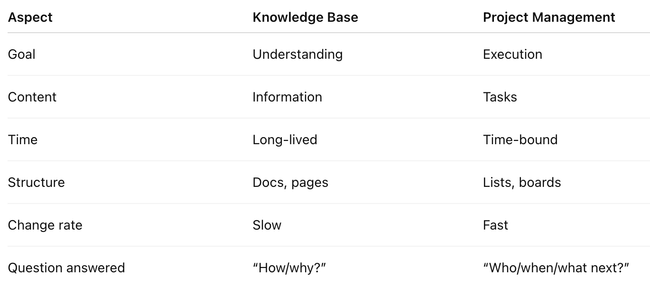
Key Differences
How They Work Together
In real teams, they complement each other:
PM tool → “Build feature X by Friday”
Knowledge base → “Here’s how feature X works and why we built it”
👉 The best systems connect both:
Tasks link to docs
Docs reference projects
Knowledge evolves from execution
If you want, I can map this specifically to your Seed / Obsidian / SHM context — that’s where this distinction gets really interesting.
Do you like what you are reading? Subscribe to receive updates.
Unsubscribe anytime